29 January 2026



Introduction to Group Communication
WhatsApp groups and communities are essential tools for connecting with friends, family, and colleagues. They are perfect for discussing where to go for dinner, sharing photos from a trip, or planning a surprise party.
Group communication has evolved significantly from traditional phone calls and SMS to modern messaging apps like WhatsApp, allowing users to talk with friends and family across borders for free or at a much lower cost. WhatsApp became popular due to its free messaging feature over Wi-Fi, eliminating concerns about international texting costs.
When choosing between WhatsApp Groups and the WhatsApp Community feature, it’s important to understand the key differences and several advantages each offers. Groups are ideal for focused conversations among a limited set of participants, while Communities allow for centralized management of multiple related groups, making organization easier for larger networks. This groups understanding helps users decide which tool best fits their needs and priorities. WhatsApp’s global reach means people around the world can stay connected and collaborate seamlessly, making it a powerful platform for both personal and business communication.
However, while messaging apps excel at conversation, they often fail when it comes to action—specifically, managing money and shared tasks. As soon as a group needs to collect funds or track who has paid, the chat becomes cluttered with account numbers, manual lists, and awkward “did you pay yet?” reminders.
To organize a successful event or group gift, you need effective communication paired with a dedicated tool for financial management.
Understanding WhatsApp Communities
WhatsApp Communities is a powerful feature designed to help users manage multiple conversations and groups in a more organized and efficient way. Instead of juggling dozens of separate WhatsApp groups, Communities allows you to create a network of up to 50 related groups, each supporting up to 1,024 members. This means organizations, schools, clubs, and large teams can connect and communicate with tens of thousands of members under one structured umbrella, with a total capacity of up to 51,200 members.
With WhatsApp Communities, managing conversations becomes much simpler. Admins can send important messages or announcements to all members at once, ensuring that no one misses out on critical updates. Admins also benefit from managing permissions, allowing them to control member access, assign roles, and regulate operational controls within the WhatsApp Community. Additionally, removing members is an essential tool for admins to maintain group relevance and enforce community standards. This feature is especially valuable for large-scale communication, where keeping everyone informed can be a challenge. By grouping related chats together, users can reduce clutter in their chat list and focus on the conversations that matter most.
For organizations and enterprises, WhatsApp Communities offers a structured way to manage multiple groups, streamline communication, and build a cohesive network. Whether you’re coordinating a large event, running a business, or managing a community project, this feature helps you keep conversations organized and ensures that your messages reach the right people at the right time.
The Limits of WhatsApp for Group Expenses
WhatsApp Communities and groups allow for large-scale communication, but they lack structure for financial goals. WhatsApp is a generic communication platform that lacks built-in financial management or task tracking tools.
The “Wall of Text” Problem: Important payment details get buried under hundreds of memes and chat messages.
Lack of Transparency: In a WhatsApp group, nobody knows the total status of the collection except the person organizing it. This leads to confusion and a lack of trust.
Manual Tracking: Admins have to manually check their personal bank accounts and cross-reference them with the group chat, which is prone to errors.
Additionally, WhatsApp does not provide a built-in reminder function to remind users about upcoming payments or deadlines. There is no way to set a reminder for specific hours or create personal tasks to help users stay organized and on top of their responsibilities. The absence of a dedicated reminder feature makes it difficult for users to follow up on group tasks and maintain accountability.
Groups Understanding and Collaboration
WhatsApp groups have become an essential tool for anyone looking to manage multiple conversations and foster collaboration—whether it’s with friends, family, or colleagues. Understanding how to use WhatsApp groups effectively can make all the difference in keeping your discussions organized and your projects on track.
One of the key differences between WhatsApp groups and WhatsApp communities lies in their scale and structure. WhatsApp groups are perfect for smaller, more personal discussions, allowing up to 1,024 members to connect, share ideas, and coordinate activities. In contrast, WhatsApp communities are designed for large-scale communication, bringing together multiple related groups under a single network. This makes it easier to manage multiple conversations across different teams or topics, especially for organizations or clubs with diverse interests. WhatsApp Communities prioritize top-down communication, making them less interactive compared to Groups.
To keep group chats productive, WhatsApp offers several features that help users manage conversations and stay organized. You can create personal tasks directly from messages, ensuring that important information doesn’t get lost in the flow of chat. Setting reminders and due dates for these tasks helps everyone stay on top of deadlines and responsibilities. Group settings allow admins to control who can send messages, manage permissions, and even remove members if needed—ensuring that only relevant discussions take place and sensitive information is protected. Users can create tasks manually in WhatsApp by using a dedicated tasks icon.
Group descriptions are another valuable feature, providing clarity about the group’s purpose and helping members understand what kind of messages and discussions are expected. By setting clear group descriptions and regularly updating them, admins can keep everyone aligned and focused on the group’s goals.
For businesses, the WhatsApp Business API unlocks even more potential. It enables support teams to automate responses, integrate WhatsApp with sales and helpdesk systems, and engage customers in a more structured way. This is especially useful for managing multiple conversations at scale, ensuring that every customer receives timely support and important messages are never missed.
How Potje Solves the Group Money Problem
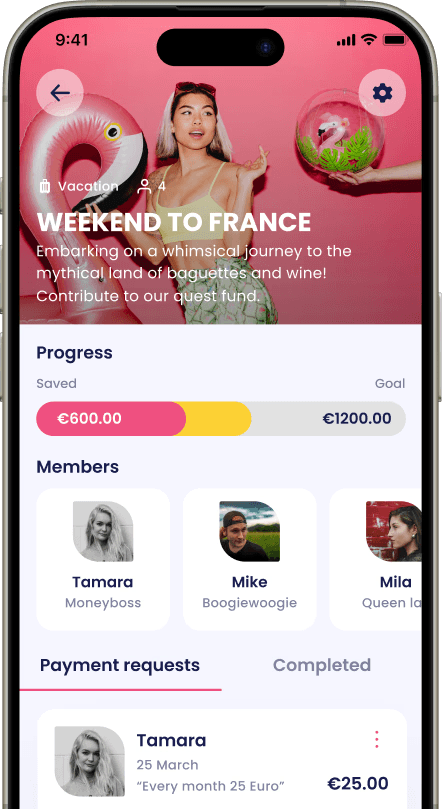
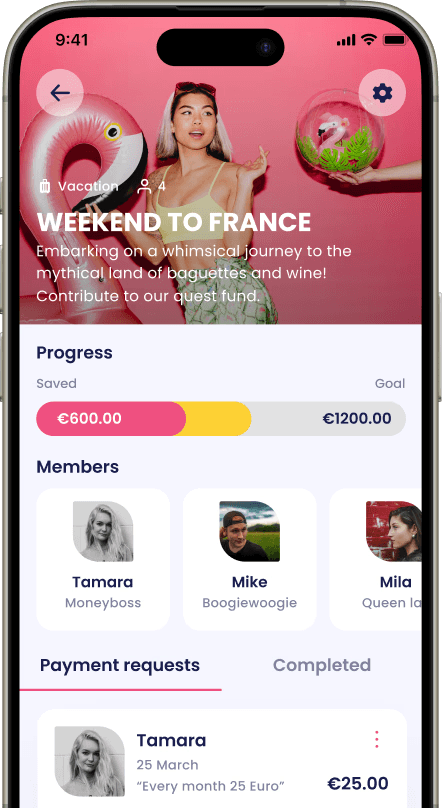
Potje is designed to work alongside your favorite messaging apps, providing the structure that WhatsApp lacks. It offers a unique set of features that enhance group collaboration by handling the financial heavy lifting.
1. From Chaos to Clarity
Instead of managing multiple conversations and trying to remember who promised to pay, Potje centralizes everything. You manage the financial "conversation" in a single place.
Real-Time Status: Everyone can see how much has been collected and how close the group is to the goal.
The "Money Boss": One person can take the lead as the "Money Boss," but without the stress of manual admin work.
2. Smart Notifications and Reminders
One of the biggest pain points in WhatsApp groups is the awkwardness of asking for money. Potje automates this.
Automated Tasks: The platform allows you to create payment requests (financial tasks) and set deadlines.
Friendly Nudges: Potje sends automatic reminders to those who haven’t paid yet. You can set reminders for specific hours, create tasks, and be reminded automatically about upcoming deadlines. This removes the social friction—it is the app asking for the money, not you.
Users can also create personal tasks and set reminders for themselves, ensuring that every task is completed on time.
3. Separate and Safe
When you collect money via a personal bank link sent on WhatsApp, those funds mix with your grocery and rent money. Potje keeps group funds separate and secure. This distinction is crucial for teams and organizations that need to ensure funds are used strictly for their intended purpose.
The Importance of Posting Frequency
In WhatsApp Groups and Communities, how often you post can make or break the group’s engagement. Consistent posting keeps members interested, sparks discussions, and ensures that important messages don’t get lost in the shuffle. However, it’s important to strike the right balance—posting too frequently can have a negative effect, overwhelming members and causing them to mute or even leave the group.
A smart approach is to create a content calendar, planning your posts and discussions in advance. This helps you deliver a steady stream of valuable information, reminders, and updates without flooding the chat. Using WhatsApp’s features, such as setting reminders and creating personal tasks, can help admins stay on top of their posting schedule and ensure that key messages are delivered on time. To create tasks and reminders, simply click the Tasks icon located in the top right corner of the WhatsApp interface.
By managing posting frequency thoughtfully, you foster a positive environment where members feel encouraged to participate, share their ideas, and stay connected. The right rhythm of messages and discussions keeps your group active and engaged, making it easier to achieve your group’s goals—whether that’s planning an event, sharing knowledge, or simply staying in touch.
Support Teams and WhatsApp
Support teams are the backbone of successful WhatsApp Groups and Communities, ensuring that conversations run smoothly and members get the help they need. By leveraging WhatsApp’s group settings and announcement group features, support teams can manage multiple conversations efficiently, send messages to large audiences, and keep everyone informed with important messages.
For businesses and organizations, integrating the WhatsApp Business API can take support to the next level. This allows support teams to automate responses, connect WhatsApp with existing sales or helpdesk systems, and provide a more personalized experience for each member. Features like creating tasks and setting reminders help support teams stay organized, ensuring that no question goes unanswered and that every important message is addressed promptly.
By focusing on excellent support and using WhatsApp’s robust features, teams can engage customers, build trust, and create a welcoming community. Whether you’re managing a small group or a large network, having a dedicated support team ensures that members feel valued and supported, leading to higher satisfaction and stronger group engagement.
Integrating Potje with Your Group Chat
You do not need to leave WhatsApp to use Potje; they complement each other.
Share the Link: Create your Potje for the event and simply share the link in your WhatsApp group description or as a pinned message. Admins can update and manage group descriptions, making it easy for members to access important information like the Potje link. Setting group descriptions helps clarify the group's purpose and ensures everyone can quickly access key details.
Keep the Chat Fun: Let WhatsApp be for the excitement and planning, and let Potje handle the boring stuff like tracking payments and chasing contributions.
Conclusion
Posting frequency and engagement in a chat group are important for keeping the vibe alive, but they won't help you pay the bills. For that, you need a dedicated tool.
By combining the communication power of WhatsApp with the financial structure of Potje, you get the best of both worlds: a fun, active group chat and a fully funded pot of money ready for your goal.
Stop scrolling through endless chats to find out who paid. Download Potje today and organize your group funds in minutes.

Social Accountability and Saving: The Missing Link to Financial Freedom
Ondersteuning voor verschillende inhoudstypes zoals artikelen, blogs, video's en meer. Rijke tekstverwerker met opmaakopties voor verbeterde.
17 november, 2025

Group Saving Apps Compared: What's Easiest, Safest, and Most Transparent?
Ondersteuning voor verschillende inhoudstypes zoals artikelen, blogs, video's en meer. Rijke tekstverwerker met opmaakopties voor verbeterde.
17 november, 2025

Group Money Platforms Compared: What’s Safe, Regulated, and Fair?
Ondersteuning voor verschillende inhoudstypes zoals artikelen, blogs, video's en meer. Rijke tekstverwerker met opmaakopties voor verbeterde.
17 november, 2025